Together 2.1 – New Ways to Import
Thursday, May 22nd, 2008Together has always been pretty capable in its support for importing all sorts of things, through the Shelf, Dock icon and system services. Together 2.1 adds three new ways to import links and files.
Automatic File Import
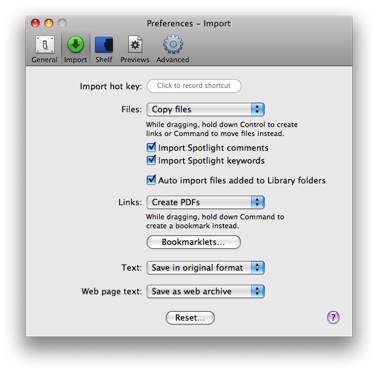 Together can now automatically import files saved in its library folders, meaning you can save files directly to Together’s folders without having to manually import them. This can be enabled by checking “Auto import files added to Library folders” in Import preferences and it’s on by default.
For documents to be imported, you can save them anywhere in Together’s library folders apart from the Support and Trash folders. Together may move the document if it’s in the wrong page (e.g. a text document in the Images folder).
This will probably remove most people’s need for specific watched folders, but that method is still possible and may be useful too.
Import Hot Key
Together 2.1 also adds support for a global import hot key, which can also be set in Together’s Import preferences.
When the hot key is pressed, links or files will be imported according to Together’s Import preferences. This will work with most web browsers, Mail, Microsoft Entourage and NetNewsWire and the Finder.
Bookmarklets
A popular request was for Together to have support for bookmarklets, so web pages can be saved to Together with a single click, so this is now available in 2.1.
You can install the bookmarklets in your browser by clicking the Bookmarklets button in Together’s Import preferences. There are three different bookmarklets to save the current page as a bookmark, web archive or web PDF.