iKanji 1.0 by ThinkMac Software
Friday, July 25th, 2008ThinkMac Software released iKanji 1.0 yesterday. iKanji is an application for learning Japanese kanji characters on the Mac. iKanji is a companion application for iKana, which helps you learn Hiragana and Katakana.
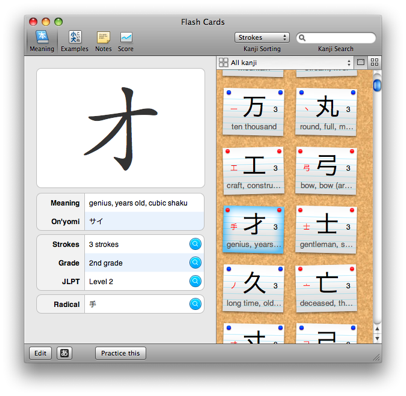 ThinkMac developer Rory Prior is a friend of mine (hence the plug) so I got to try iKanji before its release. I’m not learning Japanese and normally wouldn’t feel comfortable writing about such applications, but both iKanji and iKana are clearly exceptional learning tools. I’ve learned so much just trying them out.
Both applications are a superb example of usability on the Mac, look great, and include the sort of thoughtfulness that surprises and delights without ever being gimmicky or patronising. Also, to my surprise, they are a lot of fun.
iKanji’s learning experience is focused around flash cards and includes 2230 kanji built-in, with the ability to add your own, and nearly 20,000 example words. It can also search by kanji, meaning, radical and examples, sort kanji by stroke count or radical, allows you to add your own notes and create your own practice sets. iKanji covers Japanese school grades 1 to 6, JLPT levels 1 to 4 and 214 kanji radicals.
Following on from that are the tests. iKanji has tests for meanings, reading and writing (complete with animated stroke animations). After taking the tests, you’ll be able to see your proficiency with gold, silver and bronze stars marked on the kanji and plotted on a graph to see your performance over time.
iKanji requires Mac OS X 10.5 is available for €20 (around US$31) and can be bought with iKana for €25 (around US$40) at the ThinkMac Software store. Rory’s also confirmed that he’ll be creating iPhone versions of these applications in the (ahem!) near future.