Together 2.2 is available today, bringing improvements to tagging, groups, item categorization, tabs, the Shelf, imports and previews. Here’s a summary of the main changes:
Tagging
Together 2.2 introduces intelligent auto-tagging based on items with similar content. When items are imported or saved, Together will analyse their content and tag them based on other items with the same tag.
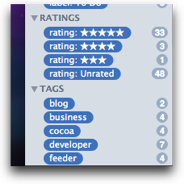 Also in 2.2, tags can be organized into bundles, and system tags (which show things such as labels, ratings and groups as though they were tags) are also shown in their own bundles. It’s now possible to show items that have all the selected tags in the tag browser, rather than any of the tags.
The new Change Tags panel replaces the Add Tags panel to add or remove specific tags from multiple items or all items in a group. This is useful as is not possible to edit specific tags in the Info view when multiple items are selected and not all items have the same tags.
Items
Together 2.2 adds a new Web Page group to show all web archives, web pages and PDFs of web pages, whether printed from a browser or web PDFs created by Together.
Items’ file creation and modification dates can be edited in the Info view by clicking on the date.
Tabs for items can now be rearranged and will scroll horizontally when there are too many to be displayed in the main window.
Web PDFs have also been improved so that you can specify the minimum size for a web page when creating a PDF in Together, with default settings in Together’s Previews preferences panel that will be used when PDFs are imported from dragged URLs.
Also, the content for notes and text documents can now be zoomed and the default zoom percentage can be set in Previews preferences.
Groups
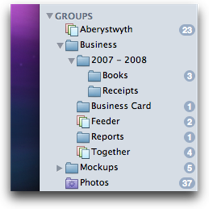 Groups and smart groups can now be nested in folders. Items can be added to new or existings groups and moved to folders using the Items menu.
Shelf
Together 2.1 added the ability for the Shelf to show options when importing. This is now improved so that, in the case of single-item imports, you can edit the name of the item being imported.
Also, Together will return to the previous application after the Shelf closes and there is a new “Find in Library” hot key to open the Shelf with the search field selected.
Importing
Together now has better handling of file promises. Sometimes when dragging from other applications, the other application is responsibile for creating the file in Together’s library, but Together would only know when that process started and so would show the new item in the library before the copy had completed. This could cause some confusion for larger files, so now Together will wait until the file has been fully copied to a temporary location.
This change also works around a problem where Mail.app will silently overwrite exported email files with the same subject, as Together now has control over the name of the imported file.
There are plenty of other smaller improvements and tweaks in this version. See the Together release notes page for a full list.