Poster Giveaway
Saturday, April 2nd, 2011The App Whisperer is giving away Mac App Store promo codes for free copies of Poster. See here for details:
Giveaway – Poster for Mac OS X – We’ve Got Codes To Give You.
The App Whisperer is giving away Mac App Store promo codes for free copies of Poster. See here for details:
Giveaway – Poster for Mac OS X – We’ve Got Codes To Give You.
Poster 1.1 is available today. Poster is an app for posting photos and videos to the web. The latest version adds support for SmugMug, posting video to Facebook and improvements to people tagging, the iPhone and Aperture plug-ins, publishing and much more.
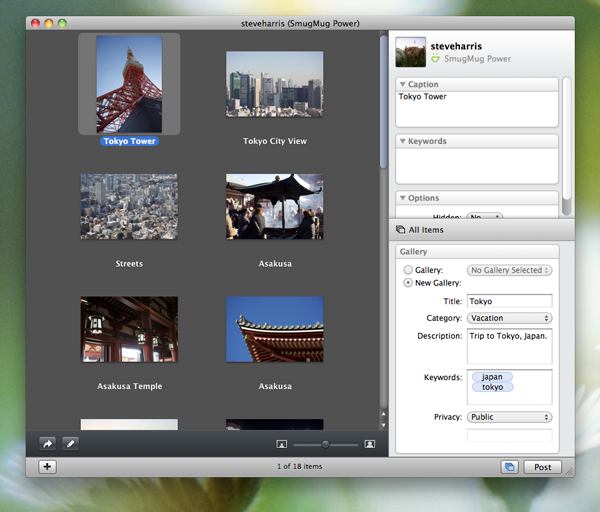
In addition to Facebook and Flickr, Poster can now post both photos to videos to SmugMug to new or existing galleries, including unlisted and password protected galleries.
SmugMug is a photo sharing site with many great features for all kinds of photographers, including fully customizable themes, HD video, comprehensive privacy options, the ability to create prints and books and even a full commerce system for professional photographers that want to sell their work.
Poster 1.0 could already post photos to Facebook profiles and Facebook pages (the ones you “Like”), and version 1.1 adds the ability to post videos to your wall too.
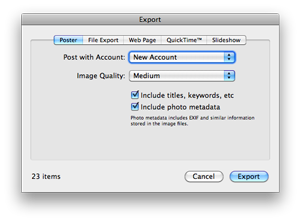
Poster’s plug-ins for iPhoto and Aperture have been improved. Both can now send information such as titles and keywords to Poster when exporting and the iPhoto plug-in gains the ability to choose an export quality for images.
People tagging has been made easier to use and can now stay in tagging mode when navigating between photos, there’s a new “Only Me” privacy option for Facebook and posting has been made less disruptive with progress and completion indicators displayed in the Dock icon, rather than an alert sheet that demands immediate attention.
Poster 1.1 requires Mac OS X 10.6 or later, is a free upgrade for all Poster 1.0 users, and is available as a 15-day trial that can be unlocked upon purchase. A full license of Poster 1.1 costs $9.95 and is available directly from Reinvented Software and the Mac App Store.
In case you missed it, Poster got a great review on Allison Sheridan’s excellent NosillaCast a week or so ago. Allison is also fairly unique in that there is a complete transcript of her audio podcast, so you can read as well as listen.
I authorized Poster to access my Flickr account and a beautiful window came up. It showed my uploaded photo in a pane on the left, and in the right sidebar it showed all of the meta data that goes along with a photo on Flickr. I could change the name, enter a description, enter tags, select a set to add the photo to, put it in a group and change moderation settings like privacy, safety, content type and accessibility to public searches. Rather than being utilitarian, the interface is what you’ve come to expect from great Mac software; simple, yet elegant. Even the tags autofill from YOUR tags you’ve used in the past.
Link: NosillaCast #293
Feeder and Poster are on Mac App Store for its launch today. Together requires more changes than those two apps and should follow in a couple of weeks, provided it is accepted and depending on how long the review process will take.
Poster is now $9.99. The version on the Mac App Store is identical in its functionality, however it will not offer to install export plug-ins for Aperture or iPhoto, as installing additional software is prohibited. Versions of the plug-ins are available for download from my site. These new versions of the plug-ins will check for updated versions as those cannot be delivered through the main app. On the price drop, existing customers will be refunded the difference.
Feeder is on the Mac App Store with its price unchanged. This version is almost identical to the regular version with the exception that it will not offer to wake your Mac from sleep for scheduled publishing, because that requires admin privileges, which is also prohibited by the Mac App Store. A workaround is to schedule wake from sleep manually in System Preferences.
Finally, a note about version numbers, which aren’t quite in line. Poster 1.0 in the App Store has all the relevant fixes from Poster 1.0.1. Feeder 2.1.6 is on my site today to bring it in line with the App Store version, but doesn’t add anything significant for existing users so it won’t appear in Feeder’s automatic software update.
Poster 1.0 is released today. Poster is an application for Mac OS X that provides a first-class experience for posting photos and videos to the web.
Until now, there hasn’t been an ideal solution for uploading photos to the web. Uploading through a web page is usually a miserable experience. iPhoto and Aperture’s support remains fairly basic, and everything else out there is clumsy to use or shows your photos as minuscule thumbnails. Plug-ins suffer from being trapped in a box, where you can’t change your mind without losing what you’ve done so far and where every button feels like a terrible burden.
Poster explodes out of that box as a standalone app for uploading to multiple sites and accounts with a sleek design that not only lets you see your photos properly, but work with them effortlessly too. Working with Flickr and Facebook at launch, Poster takes a tailored approach that makes the most of each site’s unique features.
For Flickr, Poster can post both photos and videos, auto-complete tags, allows you to create and choose sets, submit photos to groups, tag people and moderate your photos all within the app. Its All Items view lets you work with an entire set of photos as easily as just one.
On Facebook, Poster is able not only to post to your profile, but also any pages that you administer, making Poster ideal for anyone whose business, band or cause takes advantage of Facebook’s massive user community.

Poster works with the photo editing and management applications you use and can even perform some tricks of its own, such as rotating and resizing photos before uploading. As a convenience, plug-ins are provided for iPhoto and Aperture to launch Poster with the exported files.
The best part of Poster is that it is a pleasure to use. Packed with thoughtful touches, its understated design and tasteful animations are both intuitive and easy on the eye and its support for multitouch gestures and full keyboard navigation help make posting your photos and videos as enjoyable an experience as taking them.
Poster 1.0 requires Mac OS X 10.6 or later, and is available as a 15-day trial that can be unlocked upon purchase. A full license of Poster 1.0 costs $19.95.
Try Poster now: Poster.dmg