Feeder 1.4 – New Features
January 15th, 2007 by Steve HarrisI released Feeder 1.4 today and thought I could give a quick guide to the new features here.
Scheduled Publishing
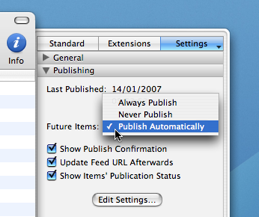 Feeder can now schedule feeds for publication and can even wake your computer from sleep to do that. It’s simple to schedule a feed to be published: tell Feeder to publish future items automatically in the Publishing section of the Info drawer then give an item in your feed a publication date in the future.
There are a couple of other options there, too. One is to “Always Publish” future items – that is the default and will give you behaviour like Feeder 1.3, where everything in your feed was uploaded regardless of its publication date and “Never Publish”, where items with dates in the future aren’t published until they become due. “Publish Automatically” behaves the same as “Never Publish” when the feed is published manually.
Also, all feeds now publish in the background. This works better with the scheduled publishing and prevents the main window from being tied up when uploading large files (e.g. podcast media files). It also means you can publish more that one feed at a time.
Editing Improvements
Feeder now automatically adds paragraphs and line breaks to the HTML Description field, making editing much easier.
Feeder is now also much more smart about when to update an item’s publication date, and will leave those alone for changes to already published or scheduled items.
Feeder also now includes support for the Dublin Core creator tag, often used by blogs, etc to have an author name that doesn’t need an email address. The field will automatically be shown in feeds that use the “News” or “Podcasting” (non-iTunes) template, otherwise you need to edit the feed’s template to display it, like so:
- Choose Item > Edit Template from the menu.
- Click Customize if it’s not already disabled.
- Choose Show: “Dublin Core” from the pop-up menu.
- Check Use next to the pop-up and check the Creator field to have it displayed in the editing windows.
Sparkle Appcasting
 Sparkle is an excellent framework that can be used by developers to give applications self-updating functionality. It’s used by a number of apps, including both of mine, and uses an RSS feed to get the latest version information. This works much like a podcast, but with downloadable applications rather than media files, hence the name “appcast”.
To enhance this experience, Sparkle introduces some additional tags that can be used in the feed and Feeder now supports all of these. Feeder will check whether a feed already uses the Sparkle extensions when the feed is imported and for existing feeds there is a Sparkle Appcasting template. You can use this template by choosing Item > Edit Template from the menu and choosing the template from the list.
When the Sparkle extensions are in use, Feeder will show a preview of the release notes as they will appear in Sparkle’s update alert.
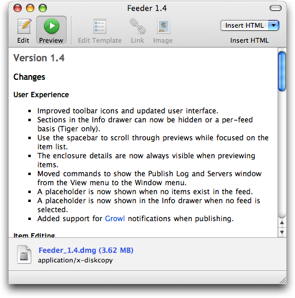
By default, only the Sparkle Version field is shown, but all fields are supported. Customize the template to show more:
- Choose Item > Edit Template from the menu.
- Click Customize if it’s not already disabled.
- Choose Show: “Sparkle” from the pop-up menu.
- Check the fields you want to show.
The Sparkle documentation and Feeder’s help files include advice on which fields to use (Feeder’s help files probably cover the non-Sparkle fields in more detail).
Developers wishing to buy Feeder for Sparkle appcasts should get in touch to receive a discount code that can be used when checking out.