A neat use of RSS that I completely forgot to mention in my CocoaRadio interview is appcasting (and I am absolutely kicking myself).
Appcasting is a term coined by Fraser Speirs to describe the delivery of software via RSS. It works the same as podcasting: the RSS enclosure tag is used to point to the downloadable file but instead of an audio file, this is an application.
I’ve been running an appcasting feed for Reinvented Software since releasing Feeder in February 2005. However, the coolest implementation of appcasting in the whole world is Sparkle.
Sparkle is a Cocoa framework by Andy Matuschak that can make applications self-updating, uses appcasting to discover new updates, displays release notes and plenty more. It is made available under a MIT license. Even better, Feeder is recommended in the documentation. 😀
I have been planning to switch my apps over to Sparkle for some time now and it’s next on my list, honest.
Creating an Appcasting Feed with Feeder
To create an appcasting feed you will need to tweak Feeder’s default template a little. Here’s how to create a new feed, whether or not you are using Sparkle:
- Choose File > New Feed from the menu.
- Enter the name of the feed (e.g. “Feeder Updates”).
- Put the URL of your software’s product page in the Link field.
- Put something appropriate in the Description.
- Click Continue.
- With the Default template selected, click the Customize button.
- Check the checkbox next to the Enclosure fields.
- Click Save.
- Click Continue.
- Check the filename and location of the feed is right for you and click Finish. A new item window will open.
Tip: if you keep a copy of your site on disk, and would prefer to save the feed in the structure of that site rather than in Feeder’s library, use Choose Another Location and select the folder where you want the feed kept. You should also enter a web-friendly filename in this case.
Editing a New Version
Each item in the feed refers to a new version of your software. You can create new items in your feed by clicking New Item in the toolbar.
- Enter the name of update in the Title field (e.g. “Feeder 1.3.4 Released”).
- Enter a link to your software’s product page or wherever in the Link field – you need to enter some sort of link or the feed won’t work in Firefox’s Live Bookmarks or OmniWeb.
- Click the disclosure arrow next to Enclosure field to show the enclosure fields.
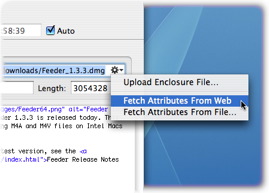 Drag and drop your downloadable file (Sparkle supports zip, tar, tbz, tgz, or dmg) onto the enclosure area to have Feeder upload it when you publish your feed.
- Alternatively you can enter the URL, click the action menu to the right of the URL field and choose Fetch Attributes from Web (or Fetch Attributes from File if it’s not yet online) to get the type and the length.
- Enter the release notes in HTML in the Description field.
- Close the item window to save the item.
You can then either click Publish in the toolbar to upload your feed or if you don’t want to publish your feed with Feeder, the XML file is always up to date on disk – you can just drag the feed from Feeder to your FTP client, command line or wherever to upload.
And if you’re a developer and using Feeder, or thinking of using it, I’d love to hear from you. Leave a comment or email steve at this domain. Thanks!
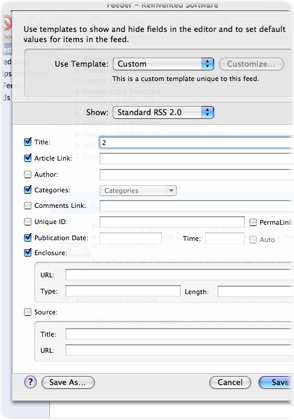 You normally choose a template when creating your feed, but you can change the template for a particular feed at any time by choosing Item > Template from the menu or by clicking the Template button in the editor windows.