Using Feeder with a Weblog and Other RSS Feeds

May 2nd, 2006 by Steve Harris

Feeder is an RSS editor, not a weblog editor like ecto or MarsEdit. All modern blogs produce their own feeds. However, RSS feeds created by Feeder can compliment a blog in a number of ways and Feeder itself has some tricks for working with other RSS feeds.

Suggested Uses

There are a number of reason why people include separate RSS feeds on their weblog. These are some real world examples:

  • Creating different feeds, possibly with slightly modified content for a specific audience. One example is this Tips & Tricks feed.
  • Creating a separate podcast feed with iTunes tags that only contains podcasts and not general blog entries. This has the advantage of providing more control over the number of episodes that appear in your podcast feed, enclosures files, etc.
  • Syndicating content by creating RSS feeds of interesting articles for friends and family.

Downloading a Weblog Feed
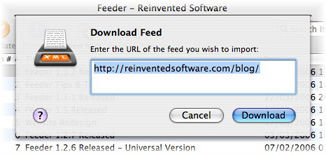
Downloading a FeedFeeder can read your most recent entries from your blog’s RSS feed. Your weblog must generate RSS 0.9x or 2.0 feeds (as opposed to RSS 1.0 or Atom feeds).

To download your blog’s feed into Feeder:

  1. Click on the New Feed button in the toolbar and choose Download Feed.
  2. Enter the URL of your blog (e.g. https://reinventedsoftware.com/blog/) you don’t need to enter the full feed URL as Feeder will try to auto-detect the feed.
  3. If successful, the feed will now be selected in Feeder’s sidebar.

Copying Items

To use items (individual posts) from your blog feed in another feed you can just drag the item from one feed to the other feed in the sidebar. You can also cut and paste items between feeds.

Reloading a Weblog Feed

After adding and changing new posts on your blog, the feed in Feeder will get out of step. You can quickly get the latest version of your blog’s entries by clicking on the Reload button in the toolbar.

Adding the Feed to Your Blog

You can publish your non-blog feed anywhere you like and put a link on the blog to the Feeder-generated feed, if necessary. How to do this is entirely dependant on the weblog system you are using.

If you are using WordPress 2 you can add an RSS widget to your blog’s sidebar. You can find out more about WordPress widgets here.

Adding Items from an RSS Reader

If you use an RSS reader application that uses the External Weblog Editor Interface, you can send news items to the selected feed in Feeder.

To do that, you need to set Feeder as the Weblog editor in the reader application, and use the reader app’s Post to Weblog (or equivalent) command to send those items to Feeder.

NetNewsWire, NewsFire and NewsLife all support this.

Feeder also supports the RSS clipboard format, which means you can drag and drop or copy and paste news items from a reader application to Feeder.

Feeder Tips & Tricks Well Received

April 26th, 2006 by Steve Harris

Thank you to everyone who has told me they find the Feeder Tips & Tricks feed useful. It seems to be going well. Ironic that it’s taken me all this time to realise that a feed for this sort of thing would be a great use of Feeder and RSS!

I have many more tips lined up, but they can take a while to write. I choose the topics based on support feedback or things I think are worth mentioning, so if anyone has any requests please leave a comment here or use the support pages to get in touch. Thanks!

London Podcaster Meetup

April 24th, 2006 by Steve Harris

Yesterday I attended the London Podcaster Meetup (aka “Draught and Darts”) for British podcasters and the like to meet Adam Curry and it was good. I got to meet lots of British podcasters I’d heard of and some I hadn’t. I didn’t play any darts though, which is just as well as I would probably have somebody’s eye out.

It was also great to meet Feeder user Don McAllister from ScreenCastsOnline and the EuroMac Podcast. You may recall a post on this blog about him quitting his day job to do podcasting full time by providing premium content to paying subscribers. That seems to be working out so far, which is excellent as he’s pioneering this model of earning a living for his work (as far as I know).

I had already met Adam Curry at the Podcast Expo in California last year, but it was good to be able to talk for longer this time about things that actually concern me. I also met PodShow boss Ron Bloom and we had a very long chat about all sorts of things, including Mac software for podcasters.

Oh, and if you’re ever looking for some independent British music, check out the BURBs site and podcast – Barry himself told me it was very much like John Peel‘s old show, which should be quite something.

I wasn’t sure whether to go to this event, but I’m glad I did. It’s always good to meet podcasters (whether or not they use my software!) and what a great bunch these were. Shame Roger Smalls wasn’t there… or was he? 😉

Feeder Editing Tips

April 21st, 2006 by Steve Harris

Here are some tips for editing items in Feeder.

Autocompletion

AutocompleteFeeder can autocomplete from other items in your feed, email addresses from Address Book and so on. You can enable or disable this feature in Feeder’s Editing preferences.

If you don’t want auto-completion on all the time, you can still get an auto-completion list by hitting Option-Esc or F5 after typing some text.

Working with Tags

You can use the Insert HTML menu in the toolbar to insert HTML tags into the description. If text is selected, Feeder surrounds the text in the tag. If no text is selected, Feeder places the cursor between the two tags.

Feeder has keystrokes for some frequently used tags, which you can see in the menu. The keystrokes are fairly standard, such as Command-B for a <b> bold tag.

Editing Images and Links

Insert Image PanelYou can insert the HTML for images and links using the Image and Link buttons in the toolbar, when the cursor is in the Description field at the bottom of the window.

You can also edit existing images and links by selecting the whole tag before clicking the Image or Link buttons.

Feeder also keeps the last 10 recent images and links inserted. Just click on the Recents button next to the URL.

For images, you can use quickly retrieve the dimensions of the image, and constrain the proportions of the image using the action menu next to the height and width. Specifying the image size can help with layout problems that can occur in Safari.

Paste Link

This is a really handy feature. If you have a URL on the clipboard, you can quickly create a link by hitting Command-Shift-K.

Credit: This was actually a feature request by someone who was addicted to this functionality in MarsEdit.

Share the Love

April 17th, 2006 by Steve Harris

Ever heard the expression “lighting someone else’s flame doesn’t diminish your own” (or something like that)? I’ve been having a conversation with Allison Sheridan from NosillaCast about this. Jonathan from the Mac Tips Daily Podcast told Allison to check out Podcast Maker as an alternative to Feeder for creating her podcast. Allison said she would, but felt awkward since she was happy with Feeder and the support she had received from me.

Now, as it happened, Potion Factory‘s Andy Kim told me that this was on Allison’s show (even though I’m still subscribed to Allison’s podcast, I have a backlog, OK!). I often talk with Andy, we’re good friends. I met both Andy and Jin at the Podcast Expo. Coincidentally, Allison wrote to me the very same day with a support question, so I mentioned in my reply that I had heard the show and told her exactly what I thought of Podcast Maker.

I think it’s brilliant and well worth checking out.

Feeder and Podcast Maker are very different products that happen to do similar things. The clues are in the names: Podcast Maker is dedicated to (surprise!) making podcasts. Feeder does podcasting, but is also a generic RSS feed editor. Both applications have their unique features. Podcast Maker is probably easier to use thanks to its focus on doing one thing and doing it well. Feeder may be more flexible, because it’s designed for a variety of different uses.

Of the two applications’ overall capabilities I bet there isn’t much in it, but frankly I haven’t done a comprehensive feature comparison to find out. I give Feeder users what I think they need, whether that is something frequently requested or an idea of my own. I expect Andy and Jin work on the same basis. How you implement these things is what makes all the difference.

I believe there is more to Mac applications than ticking boxes. Of course, Mac users care that an application does what they need, but they also want something that appeals to them on an emotional level. I can’t tell you how many times I’ve bought an app because I like it more than its competitors, regardless of whether it has as many features.

Same with Macs. I’ve always liked iMacs and all-in-one Macs in general. Yes, a Power Mac would be faster, more upgradeable, I could get a bigger monitor and it could double as a cheese grater, but I don’t care. The iMac is cute, a brilliant design and does everything I need perfectly. Obviously not everyone thinks the same as me, or Apple wouldn’t need to make any other desktop Macs.

Anyway, I digress. A man of many tangents, me.

Allison wrote back and told me that, if it were her, she might worry that plugging another podcast could take listeners away. It’s a good point, I had never thought of it from a podcaster’s perspective. True, people don’t need to make a purchasing decision between one podcast and another, because they’re all freely available, but listeners only have a finite amount of listening time.

But think about it, many of the most successful podcasters promote other podcasts on a regular basis. You plug a podcast you enjoy and they can mention you in return. It’s not mandatory, but both of you can gain listeners as a result of that extra exposure. It’s social networking, like a trackback on a blog, but it’s also word of mouth – the greatest marketing tool in the world.

The real point is this: it’s not as if someone can’t search for tech podcasts just as easily as they can search for podcast-creation software. There are all sorts of things out there: costly all-in-one solutions, bundled iLife applications, freeware, shareware, online services, you name it. And there will be more. To pretend these things don’t exist is futile.

Competition is good because it raises standards (or should!) and increases overall exposure. By mentioning Podcast Maker on her show, Allison also mentioned Feeder. People will make up their own minds. As for developers, and this could apply to anyone, it’s often so much better to work together than apart – a personal favourite example being the work we did in trying to sort out the iTunes specification.

My inspiration in this regard is NetNewsWire‘s Brent Simmons. Never afraid to mention his competitors, put source code out there, discuss all sort of things and open up his applications’ functionality for others to use (see the NetNewsWire developers page), Brent sets an excellent example for all developers – and just look how popular NetNewsWire is!

Indie developers are not like supermarkets, selling the same stuff at different prices. Our products should set us apart in a number of ways or we’re not trying hard enough.

So, the moral of the story is to share the love! It will always be good for you. 😉