Together 2.0 – Notes for KIT Upgraders

November 16th, 2007 by Steve Harris

Before I start posting about some of the features in Together, here are some more details for people upgrading from KIT. Together is my first 2.0 release, and not a free update, so I’ve tried to be very considerate to existing KIT users.

Together costs $39, KIT was $24.95 and an upgrade to Together is $14.95, roughly the difference in price. Anyone who purchased KIT in the three months preceding Together’s release (Aug 15 onwards) is entitled to a free upgrade. To get that, go to purchase Together as normal, choose an Upgrade license and enter your KIT registration code. There’s a form built into the store to email the code to you if you’ve mislaid it. You will then be told if you qualify for a free upgrade.

As Together is a paid upgrade and Leopard-only, KIT users won’t receive the usual Sparkle update notification (incidentally, Sparkle can’t handle name changes). Instead I reworked my pre-Sparkle software update mechanism to show an alert that a major new version is available (but you have to download this manually), a list of new features and the above pricing details. On this alert there is a “Skip Version” button that prevents the alert from being shown again.

Finally, I realise existing KIT users will want to try Together to see if it’s worth upgrading. Together’s library format is completely incompatible with KIT’s, and as it works with real files on disk, things could get seriously out of step if the two apps were used in parallel. So, on first run Together will offer to import your KIT library and will make copies of all the files. Once the import is completed you are given the opportunity to move your old KIT library to the Trash. If you want to keep using KIT or have any problems with the import process, you shouldn’t do that. You can also choose to defer importing until later.

(Keep It) Together 2.0

November 15th, 2007 by Steve Harris

Together IconIt feels like an eternity since I last wrote any sort of product news on this blog, so today is a long-awaited one for me and judging by some of the emails I receive, some of you too!

I released version 2.0 of KIT today and it’s now called Together. I decided to shorten the name to make it easier for people to find.

Amongst the new features in Together 2.0:

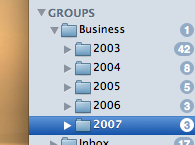
  • Folders! Considering the number of emails I’ve received on this subject, a billion people should be cheering right now.
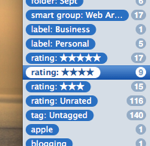
  • A new tag browser with special tags for ratings, labels, etc.
  • Widescreen mode for editing and previews.
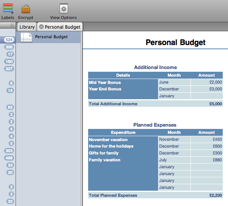
  • Edit can now be done directly in the main window and in tabs.
  • Editable text documents, web archives, bookmarks, etc.
  • Quick Look previews for all kinds of files.
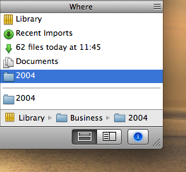
  • A new system-wide Shelf for dragging, browsing and making quick notes.
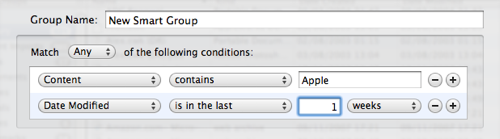
  • Spotlight searching and improved smart groups, with content searching and relative dates.
  • Encrypted documents.

And much, much more. The release notes tell the full story. Together improves on KIT in every single area.

I have been working almost constantly on Together since February, although the design process began before the release of KIT 1.2 in the summer of 2006. With that version, I intended to revive KIT after its extended break (due to my other app, Feeder, getting sucked into the podcasting whirlwind) to see if there was still interest in the application, because I had a lot of ideas I wanted to try. Thankfully, KIT 1.2 was very well received and I released KIT 1.3 in February of this year to follow that up.

However, while working on 1.3 it became clear that I was reaching the limits of what the app could realistically handle in that form. KIT was originally released for Panther in August 2004 and continued to support Panther for two years afterwards. In the meantime, things had moved on, and with Leopard, would move on again.

Considering KIT’s age and the need to retain my sanity, I decided to start version 2.0 immediately after releasing 1.3. I also decided that it should be rewritten as a Leopard-only application to use the latest technology and everything I have learned in the last three years. My aim was to create a compelling new version that would serve as a solid foundation from which the application can grow.

As such, this has been the biggest single development project I have performed to date. I wanted to blog about Together before its release but, for various reasons, the time vanished. However, I know from the emails I receive that KIT users really care about the app and write very thoughtful suggestions on how it could be improved. Much that is new in this version is the result of that feedback. So, in the next week or so I will post some more in-depth details about the new features in Together 2.0.

Feeder Now Requires 10.4 or Later

November 1st, 2007 by Steve Harris

I released Feeder 1.4.9 earlier today, which includes some fixes for issues discovered in the GM version of Leopard and will add atom:link tags to all feeds. This was made a recommendation in the RSS Best Practices profile on October 15 and is now required by FeedValidator, which shows warnings for feeds that do not include it.

The other big change is that Feeder now requires Mac OS X 10.4 or later. This has been the case anyway with the outstanding issue of compatability introduced by QuickTime 7.2, which Apple doesn’t seem in a hurry to fix. In order to make Feeder fully Leopard compatible, Panther had to go.

This was something I was planning to do anyway in the next major version as Panther support is holding Feeder back and my testing burden just doubled with the launch of Leopard. Panther usage is minimal these days, anyway.

Leopard UI vs Usability

October 31st, 2007 by Steve Harris

In a post entitled, Satisfying UI Design is Often Illogical, Scott Stevenson defends recent changes to Leopard’s UI. Under a heading of “A Design Strategy” he writes:

So we need a fresh experience. What’s the criteria?

There are tens of millions of existing Mac users all over the world, and millions of new ones waiting in the wings. They need to an experience that is both brand new, and yet familiar. Stop short, and it will not spark the user’s interest. Go too far, and you may alienate your user base. So the task is finding the balance.

This is additionally complicated by the fact that Leopard must look like it belongs in the same universe as the iPhone, iPod, the Apple Store, and a wide range of Mac applications. It’s difficult (impossible?) to come up with something which satisfies all tastes, so compromises have to be made.

I think it’s a mistake, though, to assume that the shipping designs are ever reached via apathy for a particular audience. Finding the perfect balance is hard, but some version ultimately must ship to keep things moving forward. The goal, I think, is maximum user satisfaction for the target audience. This may mean making changes that some audiences would disagree with (because not everyone experiences things in the same way), but I really doubt it’s apathy.

However, rather than the subjective views to which he alludes throughout the post, much of the criticism about Leopard, voiced very consistently by developers and users alike, is that many of the changes actually degrade usability, making the user experience less satisfying.

Some examples:

  • The new folder design makes it more difficult to recognise folders at a glance.
  • The new Dock’s “lights” do a worse job at showing an app’s running status than the triangles in the previous versions of the Dock, by offering less contrast.
  • Stack icons in the Dock make it more difficult to see which folder is represented.
  • Stacks can only access a limited number of items in a folder before falling back to the Finder; the pop-up menu listing all items is gone.
  • The menu bar is harder to read with some backgrounds.

You’ve read such a list a thousand times by now, I’m sure.

None of these things are so terrible that your Mac becomes unusable and overall Leopard looks good, but people expect better from Apple. The impression is that Leopard’s UI designers were unable to fuse form and function as well as we have come to expect. It’s both disappointment and frustration fuelling the complaints.

On the plus side, I would say Spaces, the unified window style, new Finder (undoubtedly my favourite change) and Spotlight results window are generally regarded as worthwhile improvements.

Taken as a whole, it appears more was lost than won with Leopard’s UI changes.

Scott ends with this:

If history can be used as a benchmark, the UI discussion cycle we’re currently in with Leopard is a natural part of the process. Any sort of change will bring disagreement from some users, but eventually it all settles down as people get used to it and various tweaks are made. That’s been my experience, anyway.

I would agree that some changes require an adjustment period and various issues will be addressed in time. Normally, this would happen in the next major version of the OS, but maybe we will see some changes sooner thanks to all the discussions going on.

Changing Spots

October 27th, 2007 by Steve Harris

I’ve been using the retail copy of Leopard for half a day now and it seems pretty solid, plus the latest versions of my apps don’t appear to have any problems, which is good to know.

Just about every review I’ve read says that Leopard is more evolution than revolution and is focused on the gloss, but Leopard must be the biggest release for developers that I can remember. Even apart from the headline features like Core Animation, Apple has added plenty that makes putting the basics of an application together so much easier and have addressed a slew of issues and unimplemented features that have been outstanding for years. This is great news for consistency and will help beginner and established developers alike.

I see Leopard as straddling two phases in the life of Mac OS X, marking the end of the first chapter and the start of a new one. When 10.0 was released, it wasn’t truly finished. 10.1 maybe achieved that but it wasn’t until 10.2 Jaguar that Mac OS X was truly usable. Panther was the first to really add more substance and Tiger was an obvious continuation of that.

Leopard doesn’t exactly launch us into the future, but we can get a glimpse. I think it’s the most refined release to date. Although I wish they had done better in some areas, they have at least put plenty of work into the substance of OS X and this is going to pay off handsomely in the long-term. Expect to see many great new apps and new versions of apps for Leopard.