April 6th, 2006 by Steve Harris
This is the second in a series of posts exploring the new features in Feeder 1.3.
Image Uploading
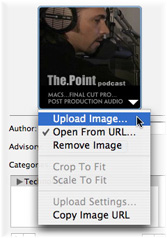 Feeder can upload an image for your feed, artwork for your podcast’s listing in the iTunes Music Store and shows a preview of these in the Info drawer.
- To have Feeder upload an image when the feed is published, drag an image file to the appropriate artwork view.
- Clicking on the artwork brings up a menu with a number of options. These vary slightly between the RSS and iTunes artwork views.
- There are restrictions on the maximum size and file format for both standard RSS and iTunes images. If the image is not the correct size or format, Feeder will create a resized version in JPEG format to upload when the feed is published.
- The maximum size for an RSS image is fixed at 144 pixels wide by 400 pixels high.
- The maximum size for iTunes images is 300 pixels square by default, but can be between 170 and 300 pixels to be valid. This can be set in Feeder’s Podcast preferences.
- For iTunes artwork, you can choose whether Feeder should crop the images to a square size or scale the image to fit. To do this, click on the iTunes artwork view and choose either Crop to Fit or Scale to Fit from the menu. Apple recommends using square images.
- If you already have an appropriate image on your web server, Feeder can use that too. Just click on the artwork view, choose Open from URL from the menu and enter the URL of the image.
- If you need the URL of an already published image for use in a podcast directory or web page, you can get this at any time by clicking on the artwork view and choosing Copy Image URL from the menu.
- Finally, you can customize where Feeder uploads the image and the name of the file on the server by clicking on the artwork view and choosing Upload Settings from the menu.
April 5th, 2006 by Steve Harris
This is the first in a series of posts exploring the new functionality in Feeder 1.3. I promised these a little while ago. These tips will also appear in the Feeder Tips & Tricks feed, which can be found on the Feeder product pages.
I thought I’d start with the first thing you notice when running Feeder 1.3 – its updated user interface.
User Interface
The user interface changes in Feeder 1.3 are focused around getting more out of the space on your screen.
- The one-pixel splitter allows the sidebar to be completely hidden, which could be useful if you only manage a single feed. Show or hide the sidebar by choosing View > Show/Hide Sidebar from the menu.
- The preview in the main window has been redesigned to show more of the actual content for proof reading and the status bar now shows the link the mouse is hovering over in the preview (if any).
- There is now an Edit Item toolbar button for the Library window – some people asked for this. You will need to customise the toolbar to see it.
- Feeder now does syntax colouring for HTML in the edit windows. You can change the colour of the tags in Feeder’s Editor preferences.
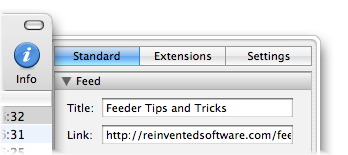
The Info drawer has been split into three different tabs to separate what is in the feed from Feeder’s own settings and reduce visual clutter:
- The Standard tab shows fields for standard RSS 2.0 tags. Everything in this section is stored in the feed.
- The Extensions tab shows extensions to standard RSS, and everything here is also stored in the feed. The “iTunes Extensions” section that was in Feeder 1.2.x has now been split into two. The “iTunes” section shows everything that appears for your podcast’s listing in the iTunes Music Store. The “iTunes Information” section shows other tags that are not displayed, but used by the store.
- The Settings tab shows where the feed is kept on disk, and the feed’s publishing settings. These settings are stored in Feeder’s internal library.
April 3rd, 2006 by Steve Harris
You might have noticed the sidebar on this blog change lately. Now there is a calendar, the latest three items from my product news RSS feed and generally it’s been tidied up.
If I wanted to, I could completely rearrange the sidebar in a minute without needing to hack any code. That’s because this blog is now using the WordPress Widgets plugin that has been trialled on wordpress.com blogs since earlier in the year.
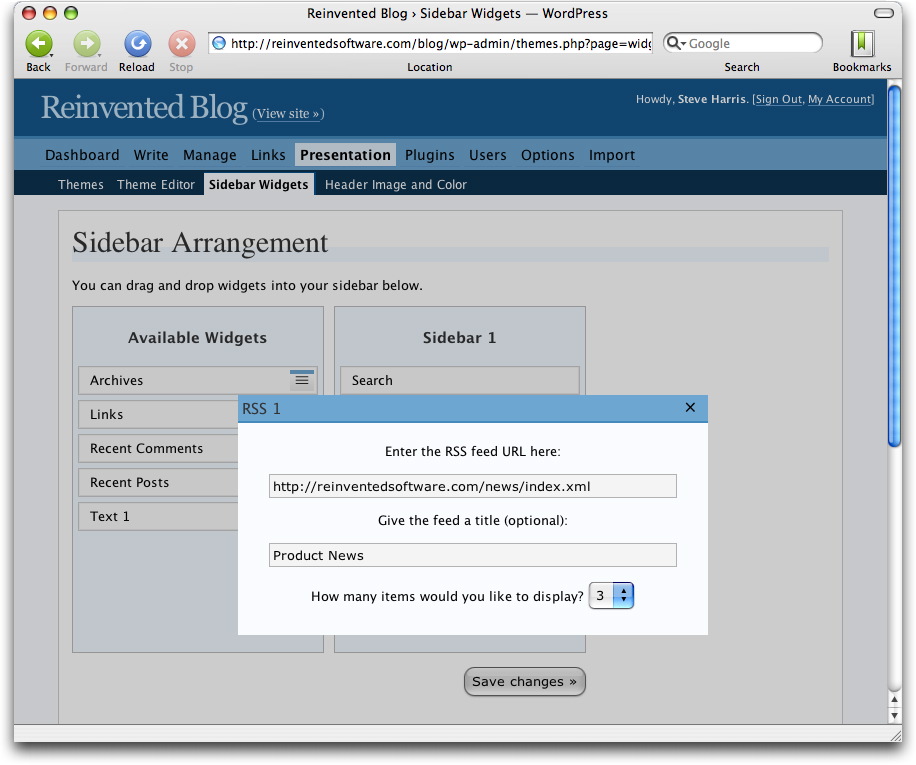
Using these widgets is really simple: you just drag and drop them into the order you want. The best part is that you can customise widgets to your liking.
There are many more widgets than the ones you see on my blog, such as Recent Posts and Comments, Free Text widgets for adding any sort of text to the sidebar, Links, Archives and so on. Plus, anyone can create widgets to do other things.
My favourite is the RSS widget (obviously). It allows you to incorporate the content from another feed into your sidebar. You can set a title for the feed, choose how many of the items to show, etc.
If your WordPress 2 blog uses the default WordPress theme, or a theme based on it, chances are the Widgets plugin will just work. All I had to do for this blog was tweak the HTML generated for the search field. Widgets are cool.
And if you ever want a free, hosted WordPress blog I can fully recommend checking out wordpress.com and if you want to host a blog yourself, wordpress.org.
April 3rd, 2006 by Steve Harris
I’ve set up a dedicated feed for tips and tricks on using Feeder. You can subscribe to the feed with this URL: http://reinventedsoftware.com/feeder/tips.xml and on the Feeder product page.
Initially the feed contains mostly updated versions of tips that have already been posted (and updated) on this blog. New tips will also be posted on this blog, although they may be in a more blog-friendly style to the content in the tips feed.
Over time these tips will cover all sorts of different areas, from cool features in Feeder you may not know about to help on performing specific tasks and in-depth looks at new functionality as it becomes available.
There are so many different things you can do with Feeder and so many different ways people want to actually achieve these things. Hopefully these tips will cover things the help files could never hope to address.
Feedback is always welcome, as are suggestions for new tips. Either leave a comment on the blog or get in touch. Thanks!
April 1st, 2006 by Steve Harris
Happy 30th birthday, Apple Computer!
- There’s a good quiz on the BBC News site.
- MacUser is running a series of articles on Apple’s history.
- Wired has a collection of articles covering all sorts of Apple goodness from over the years.
- Macworld is doing lots of stuff.
Here’s to 30 more!