December 27th, 2006 by Steve Harris
The MacSanta offer is now over, and with 104 participants from from the smallest developers to big hitters like the OmniGroup and Macworld magazine it looked to be a great success, too.
I know my sales practically doubled last week, when normally things would be slowing down for the holidays (always scary, that). Thanks to everyone who participated, bought, blogged, dugg or told their friends.
Full credit belongs to Paul Kafasis at Rogue Amoeba for setting up and running such a successful event. Thanks, Paul!
December 19th, 2006 by Steve Harris
 A group of independent Mac software developers have got together to create MacSanta, where you can save 20% on lots of great Mac software from now through to December 25th.
On the MacSanta site, you can find special deals from Rogue Amoeba, Bare Bones, C-Command, Flying Meat, Potion Factory, Red Sweater and ThinkMac, amongst many others, with even more to be added through the week.
And of course, this also includes both Feeder and KIT.
All you have to do to save 20% on the regular price is enter MACSANTA as a discount code when you check out from any of the companies’ stores.
December 11th, 2006 by Steve Harris
Feeder has been awarded PC Magazine’s Best of 2006 Award as one of the top 5 products in their Software category.
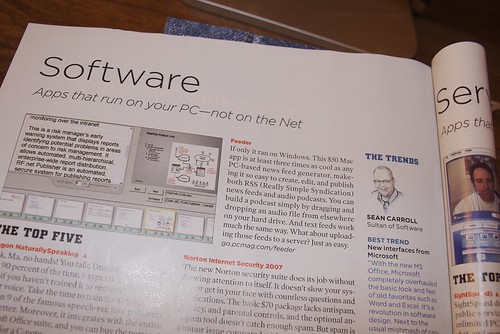
The write up is brief and can be seen in the photo above, or you could scroll down this page and find it alongside the rather blotchy icon and link to the original review from, er, 2005. 🙂
I’d like to thank…
December 8th, 2006 by Steve Harris
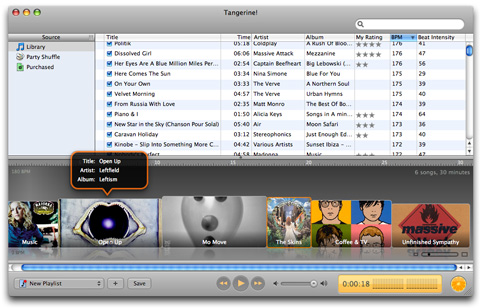
Potion Factory released Tangerine! 1.0 today. In case you missed it, Tangerine! first burst onto the scene back in October as a public beta and made quite an impact.
Tangerine! is an application for generating iTunes playlists based on the BPM (Beats Per Minute) and intensity of your music library, making it ideal for creating workout playlists or a compilation of chill-out tunes.
What makes Tangerine! really special is the implementation; it’s full of thoughtful touches making it simple to use and understand: click the Add button, choose a duration, tempo and intensity and Tangerine! will generate a playlist. You can then see each track’s BPM and duration represented with its artwork. Very effective.
I was lucky enough to get to help test out Tangerine! before it was released, and in order to do that properly, decided to go back to the gym. If you’ve ever tried working out to music, you’ll know that it has to be right – too slow or soft, it feels like running through treacle. Analysing BPM like this isn’t an exact science, and boggles this developer’s mind, but Tangerine! does an excellent job on my diverse music collection.
Of course, there are more uses for Tangerine! – sometimes you might just want to listen to slower tunes to take it easy, or keep your music upbeat while you work. Tangerine! can oblige with a few clicks of the mouse.
Tangerine! is priced at $24.95 and a 15-day trial version is available for download from the Potion Factory web site. Check it out.
December 2nd, 2006 by Steve Harris
Jack D. Miller at Mac360 has written a quick review of KIT, and has picked up on a few things that are very deliberate: familiarity.
It’s your Keep It Together application that simply holds a little of everything– documents, photos, movies, sounds, web pages, even text– all in the library (just like iTunes or iPhoto).
Search is quick and familiar. If you’ve used iPhoto or iTunes you can get into KIT very fast– as in instantly. The same goes for Yojimbo, Mori, and countless other Mac applications adopting the new look.
[…]
Is it a new look? Or, does it trace a history back beyond the early iTunes versions? To be honest, I don’t know. It all just feels so familiar.
I originally designed KIT in 2004 around the idea of being an “iTunes for the rest of your files”. I loved the way I could just drag stuff to iTunes and not have to organize it, mix different tracks from different albums in playlists and find something just by typing. This was before Tiger, with Spotlight and Smart Folders in the Finder, etc.
The three-paned interface had definitely been around a while before iTunes; what I think iTunes really added was the concept of a “Library” that shows everything coupled with very quick and simple searching, a move away from hierarchical folders in the interface and later the addition of Smart Groups/Playlists/Albums, which cleverly and automatically sort through things for you.
It’s such a straightforward and convenient approach, it’s taken for granted these days and that’s good. This consistency and simplicity means the basics of an app work exactly as people expect, which feels good and leaves more time for exploring everything else.