April 3rd, 2006 by Steve Harris
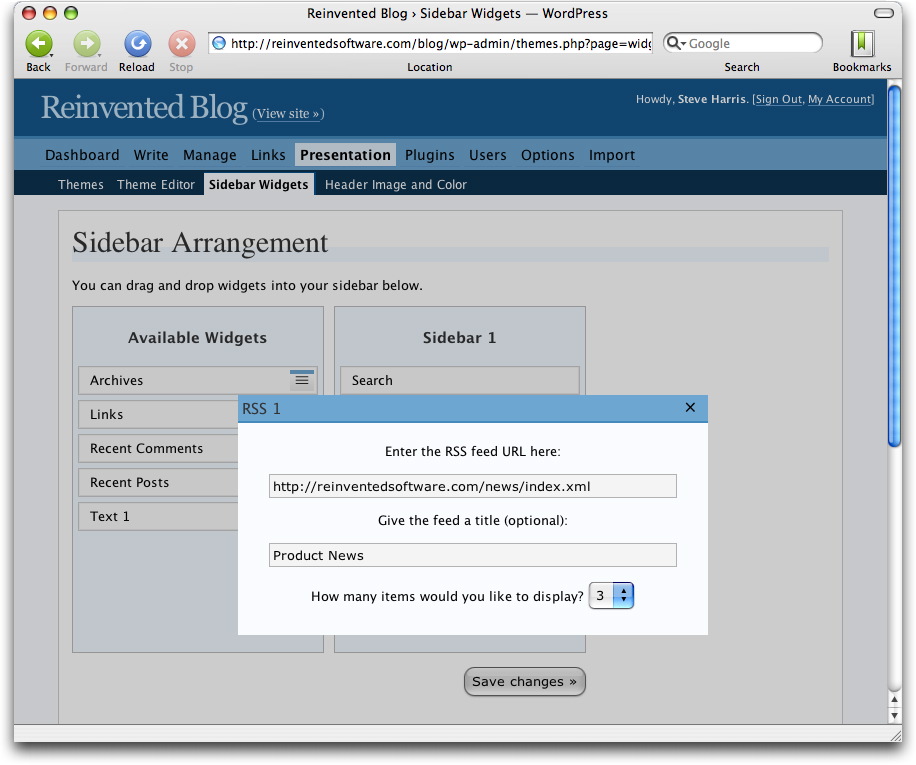
You might have noticed the sidebar on this blog change lately. Now there is a calendar, the latest three items from my product news RSS feed and generally it’s been tidied up.
If I wanted to, I could completely rearrange the sidebar in a minute without needing to hack any code. That’s because this blog is now using the WordPress Widgets plugin that has been trialled on wordpress.com blogs since earlier in the year.
Using these widgets is really simple: you just drag and drop them into the order you want. The best part is that you can customise widgets to your liking.
There are many more widgets than the ones you see on my blog, such as Recent Posts and Comments, Free Text widgets for adding any sort of text to the sidebar, Links, Archives and so on. Plus, anyone can create widgets to do other things.
My favourite is the RSS widget (obviously). It allows you to incorporate the content from another feed into your sidebar. You can set a title for the feed, choose how many of the items to show, etc.
If your WordPress 2 blog uses the default WordPress theme, or a theme based on it, chances are the Widgets plugin will just work. All I had to do for this blog was tweak the HTML generated for the search field. Widgets are cool.
And if you ever want a free, hosted WordPress blog I can fully recommend checking out wordpress.com and if you want to host a blog yourself, wordpress.org.
April 3rd, 2006 by Steve Harris
I’ve set up a dedicated feed for tips and tricks on using Feeder. You can subscribe to the feed with this URL: http://reinventedsoftware.com/feeder/tips.xml and on the Feeder product page.
Initially the feed contains mostly updated versions of tips that have already been posted (and updated) on this blog. New tips will also be posted on this blog, although they may be in a more blog-friendly style to the content in the tips feed.
Over time these tips will cover all sorts of different areas, from cool features in Feeder you may not know about to help on performing specific tasks and in-depth looks at new functionality as it becomes available.
There are so many different things you can do with Feeder and so many different ways people want to actually achieve these things. Hopefully these tips will cover things the help files could never hope to address.
Feedback is always welcome, as are suggestions for new tips. Either leave a comment on the blog or get in touch. Thanks!
April 1st, 2006 by Steve Harris
Happy 30th birthday, Apple Computer!
- There’s a good quiz on the BBC News site.
- MacUser is running a series of articles on Apple’s history.
- Wired has a collection of articles covering all sorts of Apple goodness from over the years.
- Macworld is doing lots of stuff.
Here’s to 30 more!
March 22nd, 2006 by Steve Harris
It’s great to hear that Don McAllister is quitting his job at a corporate IT firm to focus on ScreenCastsOnline and his new EuroMac Podcast full time.
ScreenCastsOnline is an innovative video podcast that shows you how to use your Mac to its full potential. Each week Don guides you through something new, whether it’s using RapidWeaver or how to get the best out of .Mac, and you can watch how it’s done on your screen or iPod.
Don has found that it takes a lot of hard work to create and maintain the show and that if he wants to take it to the next level and have any kind of work/life balance, he needs to do it full time. I fully understand!
To achieve this Don is now adding Extra! subscriptions that provide exclusive premium content, the ScreenCastsOnline DVD, high definition versions, ad-free shows, monthly newsletters and much more. Check it all out at ScreenCastsOnline.
Best wishes and congratulations to Don for making the jump!
Update: Great to hear Don on DSC #359 and Adam being so encouraging about Don’s plans.
March 22nd, 2006 by Steve Harris
A quick and easy way to password protect a feed is to set your web server to require HTTP authentication for the directory where the feed and any enclosure files reside. Here are some instructions on how to set up this authentication with Apache: Comprehensive guide to .htaccess
Authentication Support
All the best RSS readers support this authentication including NetNewsWire, NewsLife and NewsFire. As for podcatchers, iTunes and Juice Receiver support this but iPodderX (renamed Transistr) needs the URL tweaked – see the workaround below. Also there are the online services: NewsGator supports it, Bloglines needs the URL tweaked (again, see below) but Google Reader didn’t support it at the time of writing.
Feeder supports HTTP authentication for downloading, reloading and previewing feeds.
Workaround
iPodderX and Bloglines can’t read a normal URL that requires authentication. The workaround is to include the user name and password in the URL itself. For example:
http://user:password@www.example.com/feed.xml
This URL also works in the other RSS reader applications mentioned above.
Updated September 15, 2006 – iTunes 7.0 no longer requires the workaround mentioned above.